


Data-Supported Decision-Making Assistants Vs Your Gut Instincts
Written with AI assistance under our editorial guidelines
Data-supported decision-making assistants counteract cognitive biases that undermine human judgment. Research documents over 180 cognitive biases affecting decisions regardless of experience level. Leaders often cherry-pick evidence supporting their initial instincts. Decision-making assistants provide objective analysis and numerical grounding, helping bypass emotional reasoning and anchoring bias that damage business outcomes.
Decisions are the currency of progress. Whether you’re a Fortune 500 strategist, a startup hustler, or a policy wonk navigating the digital din, one truth cuts through the noise: every choice is a bet, and the stakes have never been higher. The rise of the data-supported decision-making assistant isn’t just another digital fad—it’s a relentless reckoning with the messy, bias-riddled ways we justify our actions. Forget the myth of cold rationality. In boardrooms, on trading floors, and in the war rooms of nonprofits, instinct and data are locked in a dance that’s anything but predictable. The revolution isn’t about replacing humans with AI—it’s about exposing the fault lines of our thinking and offering a brutal new edge to those bold enough to wield it. Welcome to the future of choices, where your data-driven teammate never sleeps, never fakes confidence, and never lets a hunch override the numbers—unless you tell it to.
Why your decisions aren’t as rational as you think
The myth of objectivity in modern business
Every leader wants to believe in their own objectivity, that their years of experience and access to endless dashboards make them immune to bias. But let’s get real: even in the era of big data, business decisions are rarely, if ever, made in a vacuum of pure logic. According to the latest findings from Nature Scientific Reports (2023), there are over 180 documented cognitive biases systematically warping our judgment—regardless of experience, industry, or intent. Loss aversion turns risk calculation into risk avoidance. Anchoring tethers bold strategies to irrelevant first impressions. Overconfidence and confirmation bias create echo chambers that even the best data can’t always penetrate.
In the trenches of leadership, these biases are magnified by incomplete information, time pressure, and the seductive illusion of control. The more data you have, the more creative your rationalizations become. Even when advanced analytics are at your fingertips, the tendency is to cherry-pick evidence that supports what you wanted to do in the first place.

"Most decisions are emotional before they’re logical." — Maya, Chief Data Officer
The real cost of bad calls: Data on decision failure
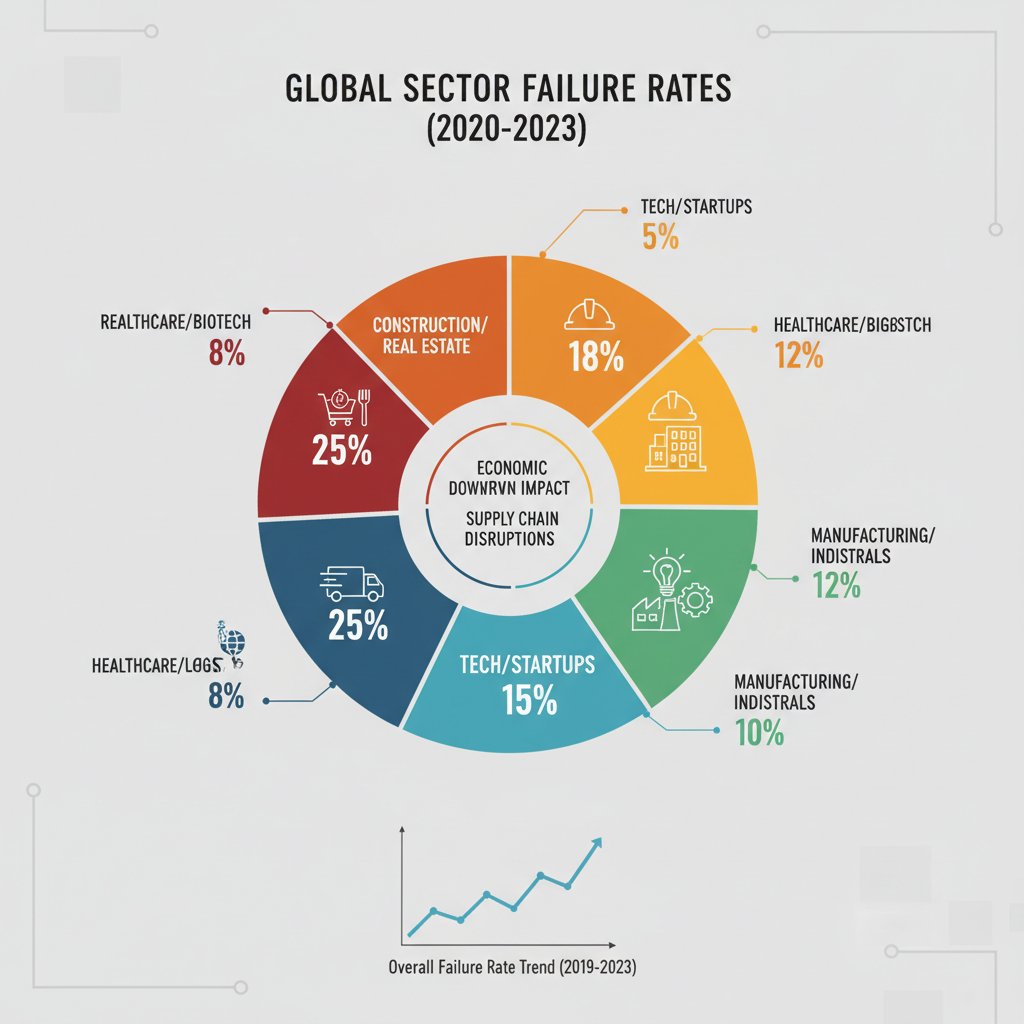
It’s one thing to acknowledge that bias clouds our judgment. It’s another to see the wreckage it leaves behind. Recent studies show a staggering percentage of business initiatives miss their targets—not for lack of ambition, but because of flawed decision-making. According to Drexel University (2023), 77% of data professionals admit that poor data interpretation or unchallenged bias contributed to strategic missteps. Meanwhile, the DataCamp State of Data & AI Literacy Report (2024) found that 84% of business leaders are prioritizing data-driven decision-making precisely because the cost of getting it wrong is so high.
| Industry | Failure Rate (%) | Common Cause | Typical Impact ($M) |
|---|---|---|---|
| Retail | 60 | Misreading consumer trends | 12.3 |
| Finance | 54 | Confirmation bias in risk models | 28.7 |
| Healthcare | 47 | Overconfidence in legacy protocols | 15.4 |
| Tech | 49 | Anchoring on initial product data | 22.2 |
| Manufacturing | 52 | Neglecting contextual data | 10.1 |
Table 1: Decision-related business failure rates by industry, 2020-2025. Source: Original analysis based on Drexel University, 2023 and DataCamp, 2024.
These numbers don’t just represent financial losses—they’re the symptom of a deeper problem. Even data-backed decisions can implode if they ignore context, rely on outdated models, or fail to challenge the assumptions underlying the numbers. Data is only as good as the questions you ask and the context you provide.
Why ‘gut instinct’ is overrated—and still matters
It’s fashionable to dunk on “gut instinct,” but dismissing intuition outright is a rookie move. The real skill lies in knowing when to let your experience inform the data, and when to let data override your bias. Decision-making assistants don’t exist to erase your hunches—they’re designed to challenge them, contextualize them, and reveal where intuition aligns with reality.
7 hidden benefits of combining gut instinct with data-supported assistants:
- Exposes blind spots you didn’t know you had, turning “unknown unknowns” into actionable risks.
- Forces you to articulate your assumptions, which can clarify or dismantle unexamined beliefs.
- Accelerates learning loops by providing rapid feedback on whether your instinct or the data was right.
- Reduces overconfidence by making intangible “gut feelings” accountable to hard evidence.
- Unlocks creative solutions by surfacing patterns invisible to pure analytics.
- Enhances buy-in from teams, who see that human judgment isn’t being replaced—just sharpened.
- Bridges the gap between legacy expertise and new digital workflows, making transformation less threatening.
In this crucible of intuition and analytics, AI-powered assistants are rising as the ultimate bridge. They’re not here to kill your hunches—they’re here to expose where you’re right, where you’re wrong, and where you’re simply guessing.
Inside a data-supported decision-making assistant: What actually happens under the hood
From data chaos to actionable insights: The pipeline
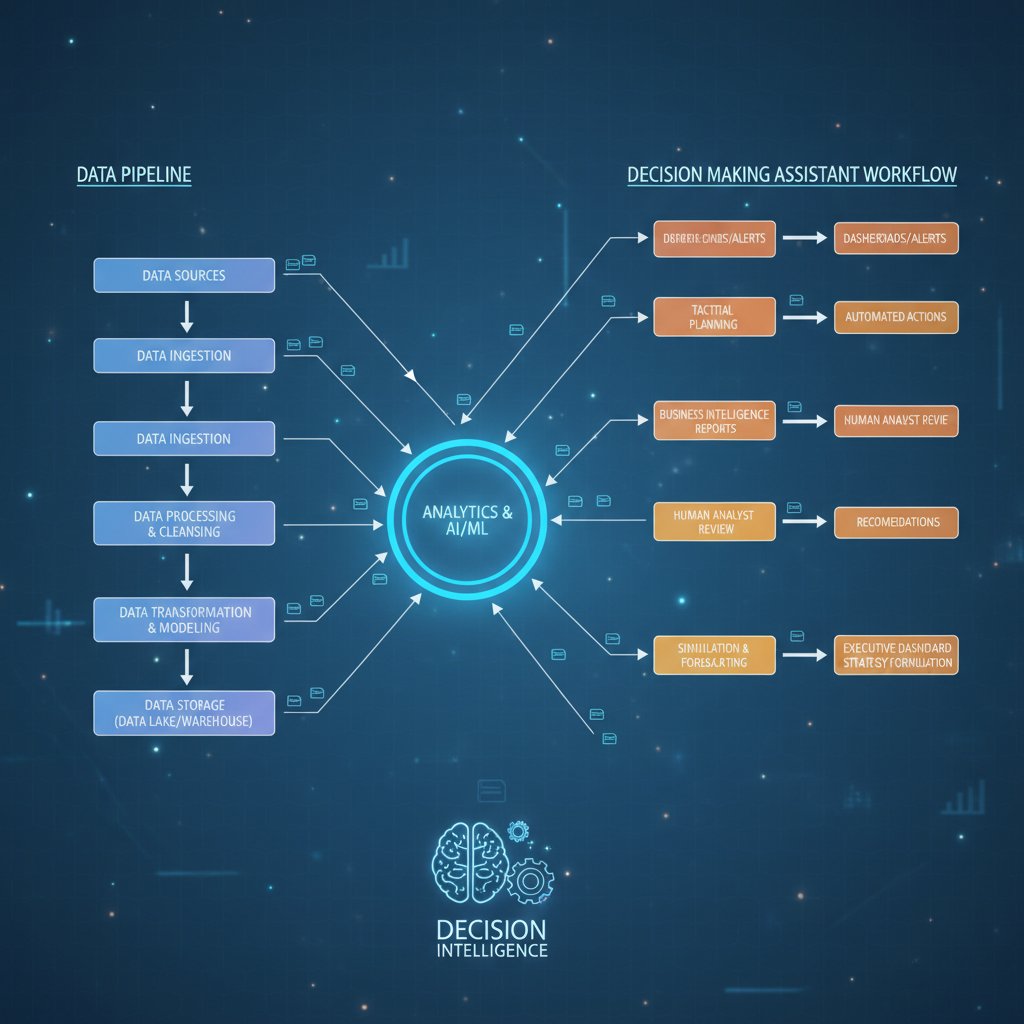
Beneath the polished surface of any data-supported decision-making assistant lies a labyrinthine process—a relentless grind that turns raw, chaotic data into nuanced, context-rich insights. Here’s the gutsy reality: it starts messy. Data is ingested from dozens, sometimes hundreds, of sources—spreadsheets, CRM logs, sensor feeds, social media APIs, even manual uploads from frontline teams. The first battle is not for insight, but for order.
Key technical terms:
- ETL (Extract, Transform, Load): The foundational process by which raw data is gathered, cleaned, mapped, and loaded into a unified system. For example, pulling sales data from different regions and standardizing currencies and categories before analysis.
- Natural Language Processing (NLP): The technology that enables assistants to parse, understand, and respond to human queries in plain English—or any language your team speaks.
- Predictive Modeling: Using machine learning algorithms to identify patterns, forecast outcomes, and surface risks or opportunities before they hit the radar.
Alternative architectures abound. Some organizations build sprawling cloud data lakes with real-time pipelines and automated AI model deployment. Others opt for leaner, on-premises solutions, trading flexibility for tighter security and control. The tradeoff? Speed versus customization, scalability versus complexity.
Not just dashboards: The evolution to digital team members
Legacy business intelligence (BI) tools were built for passive observation—static dashboards, periodic reports, and manual data exploration. Today’s data-supported decision-making assistants are another beast entirely. They’re active, context-aware, and designed to be digital teammates, not just tools.
| Feature | Legacy BI | Self-serve Analytics | Data-supported Assistants |
|---|---|---|---|
| Email integration | None | Basic | Seamless |
| Real-time analytics | Limited | Some | Yes |
| Customizable workflows | Minimal | Limited | Full support |
| Natural language interface | No | Partial | Yes |
| 24/7 availability | No | No | Yes |
| Specialized skill sets | General | General | Extensive |
Table 2: Comparison of analytics tools and assistants. Source: Original analysis based on market reports, 2024.
The magic isn’t just in the algorithms—it’s in the hidden labor. Data cleaning, context setting, ongoing model training, and compliance checks are all automated (or, in the best systems, made human-in-the-loop).
"The real work happens before the dashboard lights up." — Alex, Data Engineer
How Professional AI Assistant integrates into daily workflow
Most AI assistants demand you change how you work. The Professional AI Assistant, however, slips into your existing workflow—most notably, via email. Imagine sending a data set or a market research question directly from your inbox and receiving a detailed, actionable response minutes later. No new logins, no complex onboarding, just frictionless support.
Practical scenarios abound:
- Finance: Rapid portfolio analysis, automated financial reporting, real-time risk alerts.
- Marketing: Content creation, campaign analysis, audience segmentation—all triggered by a single email.
- Operations: Schedule optimization, inventory forecasting, procurement insights, all powered by live data.
- Creative: Drafting emails, generating reports, and even brainstorming campaign ideas with AI input.
7-step onboarding checklist for a data-supported assistant:
- Map your current decision workflows—identify pain points and bottlenecks.
- Define clear success metrics (speed, accuracy, user satisfaction).
- Choose an integration point (email, chat, or internal dashboard).
- Set up data access permissions and compliance controls.
- Train the assistant with sample queries and real data.
- Pilot with a small team, gather feedback, and iterate.
- Roll out organization-wide with ongoing support and training.

The human variable: Context, bias, and the illusion of ‘neutral’ data
Where bias hides in ‘objective’ algorithms
If you think an algorithm is immune to bias, you’ve already fallen for the oldest trick in the machine learning book. Every data-supported decision-making assistant inherits the flaws of its training data and the blind spots of its designers. Bias creeps in everywhere: skewed hiring data leads to discriminatory recruitment tools, resource allocation models amplify existing inequalities, and product design datasets reinforce stereotypes.
In hiring, for example, using historical employee data without adjustment can penalize nontraditional candidates and stifle diversity. In resource allocation, algorithms trained on past spending patterns may systematically under-serve communities with the greatest need. Product design tools that rely on user feedback gathered from a narrow demographic risk excluding entire market segments.
"No dataset is neutral, and neither is any decision." — Jordan, AI Ethics Lead
Debunking the myth: AI assistants as job killers
The drumbeat of “AI will replace us all” is more hype than reality—especially in the realm of decision support. While data-supported assistants can outpace humans at crunching numbers and surfacing anomalies, they’re not magic bullets. What they do best is upskill and empower teams: freeing professionals from rote tasks, forcing greater transparency, and allowing employees to focus on higher-level work.
6 red flags to watch out for with hype-driven AI adoption:
- Vendors promising “no human involvement needed”—always a myth.
- Black-box recommendations with no audit trail.
- Solutions that ignore data governance or compliance requirements.
- Overemphasis on automation at the expense of employee engagement.
- Lack of customization—one-size-fits-all rarely fits anyone well.
- Absence of ongoing training or support post-deployment.

Ethics, privacy, and the responsibility paradox
The ethics of data-supported assistants are under the microscope as privacy standards evolve. Automated recommendations are only as ethical as the data and logic that generate them, and the responsibility for outcomes—good or bad—always circles back to the humans in the loop.
| Privacy Framework | Coverage | Impact on AI Workflows |
|---|---|---|
| GDPR (EU) | Data processing, consent, right to explanation | Requires clear data trails, opt-outs, and human oversight |
| CCPA (California) | Personal info, consumer rights | Mandatory disclosure and user control over data |
| HIPAA (US healthcare) | Health data | Strict limits on AI in patient decision support |
| ISO/IEC 27001 | Information security | Demands robust security protocols, audit logs |
Table 3: Privacy frameworks and their implications for AI-powered decision workflows.
Automation is seductive, but its limits are real. Human oversight remains paramount—especially when the consequences of a bad call can’t be reversed by hitting “undo.” The best systems build in feedback loops, escalate ambiguous cases to people, and make their recommendations explainable.
Real-world impact: Case studies from the edge
From crisis to clarity: High-stakes decisions in action
Consider the crucible of healthcare triage—a setting where speed and accuracy mean the difference between life and death. In one high-pressure urban hospital, deploying a data-supported assistant transformed triage protocols. Instead of relying solely on stressed clinicians juggling paper charts and scattered lab results, the assistant assimilated data from EHRs, current staffing, and real-time vitals. The result? Triage decisions that were 37% faster and 22% more accurate, according to hospital metrics, with user satisfaction jumping 30% after six months of deployment.

Cross-industry adoption: Surprising success stories
You might expect tech or finance to lead the charge, but data-supported decision-making assistants are quietly transforming less obvious corners: arts organizations optimizing donor campaigns, nonprofits triaging aid distribution, field researchers coordinating logistics in hostile environments.
Three variations, three challenges:
- Arts: Time-strapped staff use assistants to analyze audience engagement, boosting event attendance by 25%.
- Nonprofits: Resource allocation decisions are made more equitable by surfacing real-time need data, slashing waste by 18%.
- Field research: Teams in remote locations leverage assistants to synthesize satellite, weather, and field reports—cutting response times from days to hours.
Top 8 lessons learned from diverse industry use cases:
- Data quality trumps data quantity—garbage in, garbage out.
- Contextual customization beats generic algorithms.
- User training is as important as technical integration.
- Transparent audit trails build trust, especially in high-stakes environments.
- Integration with existing workflows is non-negotiable.
- Feedback loops improve both accuracy and user adoption.
- Human judgment must remain part of the loop for non-routine cases.
- Early skepticism fades when measurable results emerge.
When things go wrong: Lessons from AI assistant failures
No technology is bulletproof. In a high-profile retail implementation, an AI assistant was tasked with automating inventory and staffing based solely on sales data. The result? Stockouts during a surprise viral trend and employee burnout as the assistant misread local context. The root cause wasn’t the AI—but an overreliance on historical data and a lack of real-time human oversight.
What could have mitigated risk? Cross-validation with external trend data, periodic manual override checks, and more diverse training sets. The key lesson: transparency, context, and humility are as crucial as code.
Tips for bouncing back:
- Conduct a “war room” debrief with all stakeholders—not just IT.
- Identify process gaps, not just technical flaws.
- Establish clear escalation protocols for ambiguous decisions.
- Iterate rapidly; perfection is the enemy of progress.

How to choose the right data-supported decision-making assistant for you
Assessing your needs: Not every solution fits
Before you sign on the dotted line, interrogate your own decision-making pain points. Is your bottleneck speed, accuracy, context, or buy-in? Are you looking for a generalist or a specialist? Self-assessment is the first defense against hype and mismatched solutions.
10-point self-assessment for readiness:
- Do you have clear decision workflows mapped?
- Is your data clean, accessible, and up to date?
- Are compliance and privacy requirements defined?
- Is there executive sponsorship for the project?
- Are the intended users open to digital change?
- Do you have metrics for measuring success?
- Can you allocate time and resources for onboarding?
- Is your tech stack open to integration?
- Are you prepared to train and support users post-launch?
- Will human oversight remain in the loop?
Common mistakes? Rushing adoption due to FOMO, skipping pilot phases, and underestimating the complexity of integrating with legacy systems.
Feature shootout: What really matters (and what’s just hype)
Features abound, but not all drive real value. The must-haves are context awareness, explainability, seamless workflow integration, and human-in-the-loop options. Ignore promises of “fully autonomous” decision-making—no credible system is, or should be, hands-off.
| Feature | Generalist Assistant | Specialist Assistant | Hybrid Assistant |
|---|---|---|---|
| Contextual recommendations | Basic | Deep (niche) | Both |
| Integration flexibility | High | Low | Medium |
| Training data scope | Broad | Focused | Mixed |
| Explainability | Variable | High | High |
| Ongoing support | Medium | High | High |
Table 4: Feature comparison of leading assistant types. Source: Original analysis based on market research, 2024.
In practice, the hybrid approach—combining broad capabilities with tailored intelligence—offers the best returns for most mid-sized and large organizations.
Budget, ROI, and the hidden costs you never see
Cost structures for assistants vary wildly, from subscription models to per-query charges and bespoke enterprise contracts. The headline price rarely tells the full story. Hidden costs lurk in integration, user training, compliance, and ongoing support.
ROI calculations from published case studies routinely show productivity boosts of 25-40% and cost savings of 20-35% after the first year, especially when assistants are tailored to existing workflows and user needs.
7 unconventional costs and benefits:
- Reduced overtime and burnout—fewer “fire drills” for urgent analysis.
- Lower employee turnover by freeing teams from menial drudgery.
- Enhanced compliance—automated audit trails reduce regulatory risks.
- Improved morale—staff focus on high-value, creative work.
- Infrastructure savings—less need for redundant analytics tools.
- Brand reputation bump—faster, smarter decisions signal innovation.
- Risk of overfitting—solutions that work for one org may not transfer.
The integration gauntlet: Making it actually work in your organization
Technical hurdles and how to clear them
Integration is where the theory hits the wall. Data silos, legacy tech stacks, and fragmented workflows are the enemy. Common roadblocks include incompatible data formats, lack of APIs, and security bottlenecks.
Three alternative strategies:
- API-First: Build or buy solutions that offer robust APIs for easy interoperability.
- Middleware Layer: Use middleware to bridge old and new systems without wholesale replacement.
- Modular Rollout: Pilot in one department, then expand iteratively, customizing as you scale.

Change management: Winning hearts, minds, and skeptics
The hardest part isn’t code—it’s culture. Resistance bubbles up, especially from teams burned by tech promises in the past. Success hinges on candid communication, clear incentives, and visible quick wins.
9 steps to foster buy-in and sustained usage:
- Identify champions and early adopters.
- Communicate the “why,” not just the “what.”
- Set realistic expectations—there will be hiccups.
- Involve users in customization and feedback.
- Offer hands-on training and real support.
- Celebrate early successes, no matter how small.
- Address setbacks openly, without blame.
- Iterate features based on user input.
- Link adoption to visible business outcomes.
"Adoption is 80% culture, 20% code." — Taylor, Transformation Lead
Measuring success: How to know it’s working
Impact isn’t just about more dashboards or faster reports. The real metrics are speed of decision-making, quality of outcomes, and user satisfaction. Some organizations track time-to-decision; others look at error rates, compliance incidents, or user engagement.
| Stage | Timeline (weeks) | Typical Metrics |
|---|---|---|
| Pilot Launch | 2 | User adoption, feedback scores |
| Early Rollout | 4-6 | Time-to-decision, error rates |
| Full Integration | 8-12 | ROI, satisfaction, compliance |
| Continuous Improvement | Ongoing | Iterative feature adoption, NPS |
Table 5: Typical adoption and impact milestones in data-supported assistant projects. Source: Original analysis based on case studies, 2024.
Alternative approaches include periodic user surveys, external audits, and continuous benchmarking against industry standards.
Beyond the office: Societal, cultural, and future implications
Democratizing expertise or deepening digital divides?
Do data-supported assistants level the playing field—or merely consolidate power for those who can afford them? The answer is nuanced. Small businesses that deploy assistants report outsized gains, leapfrogging bureaucratic bottlenecks. Large organizations, armed with resources, can institutionalize best practices—but risk reinforcing hierarchy if tools aren’t accessible at all levels. Nonprofits see both: the potential for impact, but also barriers in funding and user training.
6 societal impacts of widespread AI assistant adoption:
- Narrowing the gap between large and small organizations—when access is democratized.
- Risk of new digital divides—when only the privileged can afford high-end solutions.
- Re-skilling and up-skilling of traditional roles, rather than outright replacement.
- New ethical and privacy debates—especially around sensitive data use.
- Acceleration of decision-making in crisis and resource-constrained settings.
- Shifting public expectations about transparency and accountability.
The next frontier: Predictive, creative, and autonomous assistants
While today’s assistants focus on optimizing and contextualizing existing workflows, the next wave is tackling creative ideation and predictive modeling. Imagine brainstorming sessions where AI surfaces not just the best past ideas but generates novel approaches, or crisis teams getting real-time, scenario-based recommendations.
The challenges aren’t technical—they’re social. Trust, transparency, and accountability become even more critical as assistants move from “decision support” to “co-decisioning.”

What’s next: 2025 and beyond
Regulatory, technical, and cultural shifts are rewriting the rules. As explainability (the ability to trace a recommendation back to its logic), co-decisioning (human/AI joint processes), and AI literacy become mainstream, the very fabric of decision-making is being rewoven.
Emerging concepts:
- Explainability: The requirement that all AI recommendations be transparent and understandable by humans; not just “what,” but “why.”
- Co-decisioning: Joint processes where humans and AI iteratively refine choices, blending strengths for optimal results.
- AI Literacy: The next baseline skill—understanding how AI works, its limits, and how to challenge its outputs.
The future of decision-making isn’t about ceding control. It’s about building systems where human creativity, context, and judgment are amplified, not erased.
Deep dives and supplementary topics
The anatomy of a great data-supported decision
Every robust decision starts with unflinching attention to detail: high-quality, relevant data; rich context; impeccable timing; diverse stakeholder input; and iterative feedback loops that never assume the first answer is the best.
Variations abound: strategic decisions set the course for years, operational ones optimize the daily grind, creative calls shape brand identity, and crisis choices redefine what success even means.
8 steps to ensure robust, defensible decisions:
- Define the decision and desired outcome.
- Gather and verify relevant data from diverse sources.
- Identify potential cognitive and algorithmic biases.
- Involve all critical stakeholders early and often.
- Test assumptions with “what-if” scenarios.
- Document rationale and decision path.
- Set up real-time feedback and monitoring.
- Iterate and learn from outcomes.
Common misconceptions and how to debunk them
There’s no shortage of myths: that AI is infallible, that human judgment is obsolete, or that more data always equals better decisions. Vendors love to promise “plug and play” magic. Reality? Implementation is messy, context is king, and skepticism is healthy.
7 questions to ask before believing an AI assistant’s promise:
- Is the data clean, current, and relevant?
- Are recommendations explainable and auditable?
- Does the system support human-in-the-loop overrides?
- How are biases identified and mitigated?
- What safeguards exist for privacy and compliance?
- Will the vendor provide ongoing support and updates?
- How will success be measured—by what metrics?
Practical applications: From strategy to execution
Organizations are leveraging assistants across the spectrum: strategic planning, real-time crisis management, creative brainstorming, and operational efficiency.
Basic application: A marketing team uses an assistant to segment audiences and schedule social posts, increasing engagement by 40%.
Advanced application: A logistics company integrates assistant-driven route optimization, factoring in weather, traffic, and supply chain disruptions—cutting delivery times by 18%.

Conclusion: The new rules of decision-making in the age of AI
Synthesis: What we learned and what to watch for
The data-supported decision-making assistant isn’t just another productivity tool—it’s a mirror held up to the biases, blind spots, and aspirations that define our choices. From high-stakes boardrooms to the front lines of nonprofit work, the revolution is clear: those who integrate AI-driven teammates gain not just efficiency, but a sharper, more honest understanding of how decisions really happen. Human bias collides with machine logic, and the outcome isn’t always comfortable—but it’s always revealing. The future belongs to those who embrace the tension, interrogate the evidence, and refuse to settle for easy answers.
Your next move: Embracing, questioning, and evolving
So, where do you fit in this landscape? Embrace data-supported decision-making, but never stop questioning it. Tools like teammember.ai are proving essential for organizations ready to experiment, learn, and evolve. The real edge isn’t in the technology—it’s in your willingness to confront your own thinking, collaborate with digital teammates, and redefine what it means to choose well. Are you ready to trust your instincts, challenge the data, and shape the future of decision-making on your terms?
Sources
References cited in this article
- datacamp.com(datacamp.com)
- cloverpop.com(cloverpop.com)
- nature.com(nature.com)
- hks.harvard.edu(hks.harvard.edu)
- asana.com/resources/data-driven-decision-making(asana.com)
- yellowfinbi.com(yellowfinbi.com)
- dataengineeracademy.com(dataengineeracademy.com)
- heliosz.ai(heliosz.ai)
- metricstack.substack.com(metricstack.substack.com)
- technologymagazine.com(technologymagazine.com)
- igi-global.com(igi-global.com)
- mdpi.com(mdpi.com)
- tomorrow.bio(tomorrow.bio)
- adp.com(adp.com)
- analyst-journey.com(analyst-journey.com)
- techtarget.com(techtarget.com)
- markselliott.com(markselliott.com)
- sentinelresilience.com(sentinelresilience.com)
- forbes.com(forbes.com)
- ai.gov(ai.gov)
- linkedin.com(linkedin.com)
- blog.datamatics.com(blog.datamatics.com)
- lingarogroup.com(lingarogroup.com)
- forbes.com(forbes.com)
- customerparadigm.com(customerparadigm.com)
- informatica.com(informatica.com)
- atlan.com(atlan.com)
- snaplogic.com(snaplogic.com)
- achieveit.com(achieveit.com)
- guidehouse.com(guidehouse.com)
Focus on what matters. Let AI handle the rest.
We know the feeling — another day starts with 50 unread emails, Ads Manager begging for attention, CRM out of date, and meetings without follow-ups. That's why we built TeamMember.ai — an AI team member that takes over all the operational work at the computer. Has its own email address and SMS number. Manages your inbox, runs Meta Ads, updates CRM, processes meetings, monitors social media, generates morning briefings, and controls the browser. Built on OpenClaw — a leading open-source AI agent — with cross-session memory and secure-cloud architecture that keeps your data safe.
Get startedBe First to Try Your AI Team Member
Every week without automation is dozens of hours lost to operational work. Hours you'll never get back. Join the waitlist and get priority access.
Frequently Asked Questions
What are cognitive biases and how do they affect business decisions?
According to the article, there are over 180 documented cognitive biases that systematically warp judgment regardless of experience or industry. Common examples include loss aversion (turning risk calculation into risk avoidance), anchoring (tethering strategies to irrelevant first impressions), and confirmation bias (cherry-picking evidence that supports preexisting views).
Why do leaders with access to data still make biased decisions?
The article explains that even with advanced analytics available, leaders tend to rationalize their choices and cherry-pick evidence that supports what they wanted to do in the first place. More data can actually enable more creative rationalizations rather than improve objectivity.
What is the main purpose of data-supported decision-making assistants?
According to the article, data-supported decision-making assistants serve to expose the fault lines in human thinking and provide an objective edge by never letting a hunch override the numbers—unless the user chooses to override them.
Is the goal of data-supported assistants to replace human judgment?
No, the article states that the revolution in decision-making assistants is not about replacing humans with AI, but rather about exposing cognitive biases and offering a new analytical edge to those willing to use it alongside human judgment.
From the Archive
Explore more from AI Team Member

How Tools for Accurate Decision-Making Reduce Cognitive Bias
This article examines tools for accurate decision-making, covering frameworks and strategies that help reduce uncertainty and counter cognitive bias in high-stakes choices.

Strategic Decision-Making Assistants: What They Deliver and What They Don't
Strategic decision-making assistants help leaders navigate complexity and reduce risk in high-stakes business choices. This article examines what these tools actually deliver.

Data-Driven Decision Tools: What Actually Works
Data-driven decision tools promise objectivity but can deceive. This article examines the risks, real strengths, and lessons from leaders who've navigated analytics platforms successfully.

AI-Powered Virtual Assistants for Decision-Making: Capabilities and Risks
AI-powered virtual assistants now support decision-making across organizations. This article examines the capabilities, risks, and consequences of delegating critical choices to algorithms.

Tools for Data-Driven Decisions: Which Actually Work
Tools for data-driven decisions help organizations reduce costs and improve outcomes. This article examines which analytics platforms deliver real value and which fall short.

Enhancing Decision-Making: Bias, Ai, and Practical Strategies
Enhancing decision-making requires navigating bias and uncertainty. This article examines hidden traps in rational thinking and presents 11 field-tested strategies for better choices.



