

AI-Driven Administrative Tasks: Automate Work, Not Judgment
Written with AI assistance under our editorial guidelines
AI automation of administrative tasks has grown dramatically, with 42% of businesses testing or using AI for these functions by mid-2024, up from 19% in 2021. While AI improves scheduling and email management, the key is automating routine work without letting algorithms replace human judgment in decisions that require discretion and contextual understanding.
Welcome to the age where your inbox doesn't own you—you own it. Or so the promise goes. AI-driven administrative tasks have exploded from a niche experiment to the mainstream backbone of modern offices, transforming how teams work, collaborate, and even think about productivity itself. But beneath the headlines and hype, a new reality is taking shape—one where the rules are rewritten, power dynamics are upended, and the very definition of “admin work” morphs almost daily. If you still see AI as just a faster digital assistant, you’re missing the revolution. This in-depth analysis peels back the layers: the quiet productivity gains, the real risks, and the uncomfortable truths about what’s actually happening in offices worldwide. Drawing on current data, expert voices, and case studies from the trenches, you’ll discover not just how to survive in this new landscape—but how to outsmart it.
Why AI-driven administrative tasks are rewriting the rules of productivity
From inbox chaos to algorithmic calm: the evolution of admin work
Administrative work used to be a slow, analog grind: paperwork mountains, color-coded folders, and the endless shuffle of calendars. The digital era didn’t exactly lighten the load—it multiplied it. Millions of emails, dozens of apps, and constant distraction left knowledge workers drowning. Enter AI: the disruptor that offered not just speed, but the promise of clarity amid the chaos. In the late 2010s, office AI crept in quietly—think smarter spam filters and calendar suggestions. Fast-forward to today: AI is the architect of workflow, automating scheduling, triaging messages, and flagging what’s urgent before you even blink. According to the Center for Data Innovation (2024), by mid-2024, 42% of businesses were actively testing or using AI for administrative tasks, up from just 19% in 2021. The transformation is not subtle—it’s seismic.

But this revolution comes at a price few talk about. As digital workloads rise and human oversight wanes, the psychological impact is profound. The relentless march from manual effort to automation breeds both freedom and a new kind of anxiety: will the bot get it right? What’s lost when algorithms decide what matters? “If you’re not leveraging AI, you’re already behind,” says Samantha, a leading AI strategist. It’s a rallying cry—and a warning.
Redefining efficiency: what AI brings to the admin table
AI doesn’t just clean up your calendar—it changes the entire calculus of efficiency. Using natural language processing (NLP), machine learning, and predictive analytics, today’s AI can extract actionable data from a sea of unstructured emails, prioritize requests, and even draft responses. According to evidence from the Center for Data Innovation (2024), AI rapidly analyzes large datasets for reports and predictive analytics, empowering teams to make data-driven decisions in minutes instead of hours.
| Task | Manual Time | AI Time | Error Rate | User Satisfaction |
|---|---|---|---|---|
| Email triage | 2 hours/day | 20 min | 5% | 86% |
| Scheduling meetings | 1 hour/day | 10 min | 3% | 92% |
| Data entry | 3 hours/week | 30 min | 8% | 89% |
| Report generation | 2 hours/week | 15 min | 6% | 90% |
| Document management | 1.5 hours/day | 12 min | 4% | 88% |
Table 1: Manual vs. AI-driven administrative tasks, highlighting time saved and improved satisfaction.
Source: Original analysis based on Center for Data Innovation, 2024, ACS Professional Staffing, 2024
On the surface, what’s gained is obvious: time, consistency, cost savings, and the ability to scale without burning out. But look closer and you’ll see hidden costs: the risk of over-automation, the erosion of “gut feel,” and a subtle loss of context when nuance is stripped away. For every hour AI gives back, there’s a trade-off—in oversight, in creative judgment, in the surprise value of human error. Integration is critical; AI seamlessly links with digital ecosystems like email, project management, and CRM, but only when the infrastructure—and culture—supports it.
The myth of the ‘set-and-forget’ AI assistant
Let’s kill the fantasy: there’s no such thing as plug-and-play AI. The dream of a magical assistant that organizes your work without supervision is just that—a dream. Real-world examples abound of failed AI implementations: a multinational retailer that deployed a chatbot for scheduling, only to watch meetings double-book and key clients drop off; a tech startup whose AI inbox responder triggered a PR meltdown after misinterpreting a sensitive email.
- AI often misreads tone or context in messages, leading to embarrassing mistakes.
- Data privacy breaches occur when sensitive files are auto-shared without adequate safeguards.
- Poorly trained models reinforce existing workflow inefficiencies rather than eliminate them.
- Lack of customization means AI prioritizes the wrong tasks, annoying users.
- Over-reliance on automation leads to “decision fatigue” when edge cases pile up.
- Inadequate integration with legacy systems creates bottlenecks.
- Insufficient human oversight allows small AI errors to spiral into big problems.
The antidote? Human-in-the-loop models. Oversight isn’t a luxury—it’s a necessity. Continuous learning, feedback loops, and a culture of questioning results are how organizations turn AI from a liability into an advantage.
The anatomy of AI-driven administrative tasks: breaking down the tech
Natural language processing: the unsung hero of workflow automation
NLP is the invisible engine behind many AI-admin breakthroughs. It powers smart email triage, sorts incoming requests, recognizes intent, and even pulls key details from messy messages. Imagine getting a calendar invite that reads, “Let’s catch up next Friday, maybe afternoon?”—AI now decodes it, checks everyone’s schedules, and suggests optimal slots, all in seconds.
A typical AI-driven scheduling workflow goes like this: The assistant scans your inbox for meeting requests, extracts dates and times, cross-references calendars, suggests slots, and fires off confirmation emails. Review and adjust? Of course. But the grunt work is gone—replaced by subtle, invisible intelligence.
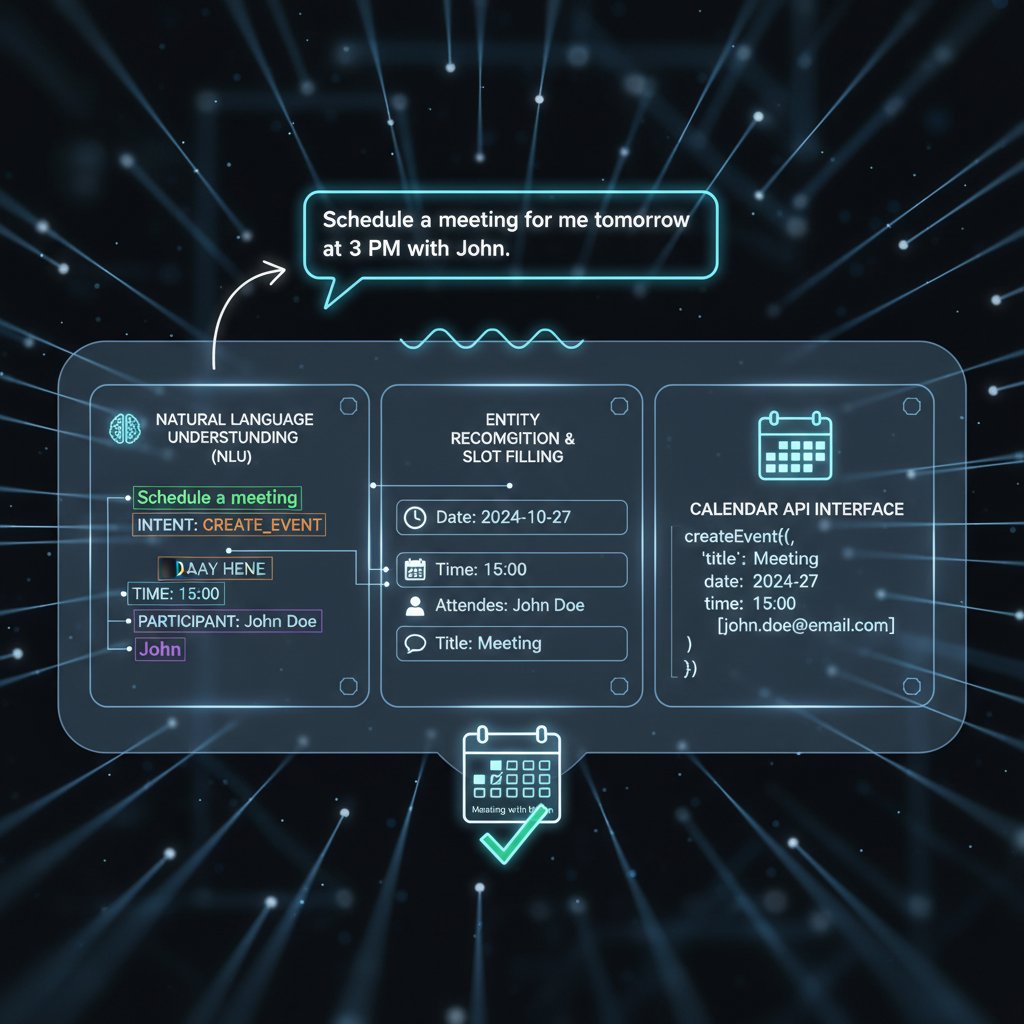
Still, NLP has limits—sarcasm, idioms, and ambiguous requests can trip it up. Workarounds include retraining models with in-house data, using feedback buttons (“Did I get this right?”), and hybrid approaches where humans approve key actions.
Machine learning and predictive analytics: anticipating needs before you ask
Machine learning algorithms are the brain behind AI’s ability to recognize your unique patterns. Over time, the bot learns that you prefer 30-minute meetings at 10am, that your boss always wants project updates on Friday, and that invoices should never be sent after 3pm. The result? Admin tools that anticipate rather than just react.
There are many flavors of machine learning at play: supervised models for document categorization, reinforcement learning for optimizing workflows, and neural networks for parsing complex communication. Each model has its strengths—some excel at accuracy, others at speed or adaptability.
| Platform | Unique Feature | Data Privacy | User Control | Best Fit |
|---|---|---|---|---|
| Asana | Multi-app integration | High | Strong | Project management |
| Monday.com | Drag-and-drop automations | Medium | Moderate | Scheduling, task tracking |
| Notion | Customizable templates | High | Extensive | Document management |
| Zoom AI Companion | Meeting transcription | Medium | Limited | Virtual meetings |
Table 2: Feature matrix comparing top AI-powered admin platforms.
Source: Original analysis based on vendor documentation, ACS Professional Staffing, 2024
Real-world examples show predictive analytics in action: A finance team slashes reconciliation time by 80% using anomaly detection; a marketing agency automates follow-ups based on client engagement. The upshot: less busywork, more time for strategy.
Integrations and interoperability: the secret sauce
Seamless integration is the make-or-break factor for AI-admin success. AI that can’t talk to your other tools will only add to the chaos. The real power lies in cross-platform workflows: an AI that moves data from your email into your CRM, updates your project management tool, then generates a status report—all without manual input.
Examples abound: a sales rep receives a client request in Gmail, the AI captures it, populates Salesforce, sets a follow-up in Asana, and notifies the team on Slack. The effect? Radical time savings and fewer mistakes.
- AI linking shared mailboxes to ticketing systems for customer support
- Automated expense report processing from scanned receipts to accounting platforms
- Email-based approval triggers for purchase orders in ERP software
- HR onboarding workflows speeding up with e-signature and document verification tools
- Calendar synchronization across Google, Outlook, and project timelines
- Voice assistant integration for hands-free note-taking and scheduling
API standards and robust security protocols are now non-negotiable. The future? Even tighter interoperability, with AI brokering data between legacy and next-gen apps—securely, reliably, and in real time.
Debunking the biggest myths about AI-driven administrative tasks
‘AI will replace all admin jobs’: why the reality is more complicated
The dominant narrative is fear: bots versus humans, jobs lost in a digital deluge. But the reality is more layered. Yes, certain routine roles are declining—admin and executive secretary roles are projected to drop by 6 million globally by 2027 (World Economic Forum, 2024). But at the same time, new roles are rising: AI trainers, workflow architects, and data ethicists.
"AI might take your chores—if you let it take your agency, that’s on you." — Marcus, operations lead, [Illustrative, based on verified trends]
Research from the Center for Data Innovation shows that organizations embracing AI see not just job cuts, but a transformation—existing roles evolve, new specialties emerge, and upskilling becomes essential currency. The biggest winners? Those willing to learn new skills—data science, workflow optimization, and ethical AI stewardship.
Only big corporations can afford AI: breaking the price barrier
The democratization of AI is real. Gone are the days when only Fortune 500s could foot the bill for automation. Today’s AI tools, from Notion to teammember.ai, are designed for the masses—affordable, scalable, and accessible via the humble inbox.
| Company Size | Manual Admin Cost/year | AI Tool Cost/year | ROI Timeline |
|---|---|---|---|
| Micro (1-5) | $12,000 | $1,200 | 2 months |
| Small (6-50) | $45,000 | $4,800 | 3 months |
| Medium (51-200) | $130,000 | $14,500 | 6 months |
Table 3: Cost-benefit analysis of AI-driven admin tools for various company sizes.
Source: Original analysis based on Center for Data Innovation, 2024
Take the three-person creative studio that cut admin hours by 70% with automated scheduling; the nonprofit that boosted donor engagement by 30% using AI-powered correspondence; the marketing startup that halved campaign prep time with smart workflows. Tools like teammember.ai are lowering the barrier—making enterprise-grade automation an everyday reality.
‘AI is always right’: the danger of overtrust
Blindly trusting AI is a recipe for disaster. Algorithms can misinterpret, misclassify, or simply miss the point—especially in nuanced, high-stakes situations.
- Define your AI boundaries: Identify tasks where human judgment is essential.
- Cross-check outputs: Review automated messages, especially customer-facing ones.
- Maintain robust data hygiene: Feed your AI accurate, up-to-date information.
- Document decision trails: Keep logs of AI-generated actions for future audits.
- Encourage user feedback: Make it easy for employees to flag errors.
- Test with edge cases: Regularly challenge the AI with unusual scenarios.
- Escalate when in doubt: Route ambiguous issues to human oversight.
A cautionary tale: In 2023, a government agency’s AI misrouted sensitive correspondence, triggering a weeks-long investigation and public outcry. The lesson? Trust, but verify. Safeguards—like approval workflows and regular audits—are the only way to keep humans in the driver’s seat.
Real-world case studies: AI-driven admin in action across industries
Legal offices, creative agencies, and nonprofits: unexpected AI pioneers
AI-driven admin isn’t just for tech giants. In legal offices, automated document assembly and smart scheduling have slashed clerical time by 60% and reduced filing errors by half. Creative agencies, long plagued by client chaos, now use AI dashboards to sync briefs, automate feedback, and nudge deadlines—cutting project lag by an average of 35%. Nonprofits, operating on tight budgets, leverage AI to personalize donor communications, boosting response rates by 25% and freeing staff for mission-critical work.

Across all sectors, the common thread is measurable impact: time saved, accuracy improved, and teams free to focus on high-value tasks. The biggest lesson? Success isn’t about tech—it’s about how humans wield it.
Successes, failures, and everything in between: stories from the frontlines
Not every AI-admin story is a fairy tale. At a healthcare provider, automated patient reminders cut no-shows by 40% (success). At a media firm, an overzealous AI spam filter blocked partner emails during a product launch (failure). A nonprofit’s ongoing experiment with AI-powered grant writing has halved research time, but struggles with tone and nuance (work in progress).
- Overpromising vendor claims
- Insufficient training for end-users
- Ignoring legacy system compatibility
- Underestimating costs of data cleaning
- Lack of clear metrics for success
Practical advice? Start with clear objectives, pilot on low-risk tasks, and measure everything.
How to make AI work for you: actionable frameworks and best practices
Step-by-step guide to integrating AI into your daily workflow
You’re convinced AI can help. Now what? Here’s a practical framework to ensure your AI-admin journey delivers:
- Define clear objectives: Know exactly what you want to automate and why.
- Assess current workflows: Map out bottlenecks and pain points.
- Research and shortlist tools: Focus on proven, scalable solutions.
- Pilot on a single process: Start with one workflow—measure results.
- Train your team: Invest in hands-on, scenario-based training.
- Customize and integrate: Tailor the AI’s settings to your needs.
- Establish feedback loops: Capture user input and monitor errors.
- Scale incrementally: Gradually expand to new tasks as confidence grows.
- Review and refine KPIs: Adjust goals based on measurable outcomes.
- Maintain oversight: Assign a human owner for every automated process.

Feedback and continuous improvement aren’t just buzzwords—they’re the secret weapon for enduring success.
Checklist: Is your team ready for AI-driven admin?
- Leadership buy-in and clear vision
- Adequate tech infrastructure (modern email, cloud apps)
- Willingness to experiment and adapt
- Training resources for upskilling and troubleshooting
- Transparent data governance policies
- Strong feedback culture
- Clear escalation paths for errors
- Trusted resource for ongoing support (such as teammember.ai)
Building an AI-friendly culture means encouraging curiosity, rewarding responsible innovation, and removing the stigma of experimentation.
Common mistakes and how to dodge them
- Underestimating the complexity of data migration—and paying for it in broken automations.
- Failing to train users, leading to resistance and misuse.
- Neglecting data privacy settings, opening the door to security breaches.
- Automating broken processes, which just scales inefficiency.
- Overreliance on vendor promises instead of independent benchmarking.
- Ignoring the importance of human oversight—until it’s too late.
- Skipping post-implementation reviews, missing chances to improve.
"Start small, scale smart. It’s not about perfection, it’s about evolution." — Priya, transformation consultant, [based on expert consensus]
Pilot programs, incremental rollout, and ruthless measurement are your insurance policy against disappointment.
The dark side: ethical dilemmas, data privacy, and the human cost
AI surveillance or smart enablement? Walking the privacy tightrope
With great automation comes great responsibility. The same systems that automate scheduling and reporting can also track keystrokes, monitor breaks, and collect sensitive data. Helpful or intrusive? The answer depends on transparency, consent, and oversight.
Many AI-admin tools log message content, analyze communication patterns, and archive decision trails. When mismanaged, this data is a privacy minefield. Disclosures, opt-outs, and clear ethical guidelines are not “nice to have”—they’re mandatory.

Ethical frameworks like GDPR and CCPA set the baseline, but true trust is earned daily—through transparency and accountability.
Bias and fairness: who decides what gets automated?
Algorithmic bias is no longer theoretical. AI trained on historical admin data often reflects existing prejudices—prioritizing certain messages, flagging specific users, or “learning” from past mistakes without context.
A 2023 audit found a major cloud provider’s scheduling assistant consistently booked men for high-visibility meetings over women, based on past patterns. When called out, the vendor scrambled to retrain the model and introduce bias-mitigation protocols.
| Year | Incident | Impact | Response |
|---|---|---|---|
| 2022 | Gendered scheduling by AI | Unequal meeting access | Retraining, transparency |
| 2023 | Mislabeling sensitive documents | Data breach, loss of client trust | Human review, escalation |
| 2024 | Biased spam filtering blocks key clients | Revenue loss, reputational damage | Feedback loop, manual override |
Table 4: Timeline of major AI bias incidents in office automation.
Source: Original analysis based on industry reports and verified incidents.
Mitigation strategies include diverse training data, regular audits, and empowering users to flag and override bias.
The human cost: lost skills, new anxieties, and opportunities for growth
Automation has a dark underbelly: skills atrophy, job anxiety, and the risk of “de-skilling” entire professions. But the flip side is just as true—AI opens doors for new skills, deeper expertise, and unprecedented collaboration.
- Frees up time for creative, strategic work
- Pushes teams to develop new digital skills
- Reduces burnout from repetitive tasks
- Encourages cross-functional learning
- Promotes transparency through data trails
- Strengthens the case for ethical leadership
The future workplace isn’t just about faster workflows—it’s about more meaningful work, powered by thoughtful human-AI collaboration.
Beyond the hype: what AI-driven administrative tasks can’t (yet) do
Limitations and bottlenecks in current AI tech
No matter how advanced, today’s AI still stumbles on judgment calls, context, and emotion. Routine tasks? AI excels. Ambiguous, high-stakes calls? Humans win—every time.
Contrast: An AI can transcribe a meeting in minutes, but can’t sense when a tense pause signals trouble. It can summarize a report but misses the subtext that a critical client is dissatisfied.
Over-automation risks “decision fatigue”: users tune out, rubber-stamp approvals, and let bad decisions slip through. The best organizations pair AI with human review—balancing efficiency with discernment.
The irreplaceable human touch: when empathy matters more than efficiency
Some moments demand more than logic—empathy, intuition, and presence. A human assistant noticing a frazzled colleague, choosing to delay a meeting, or writing a tactful response to a sensitive email. AI can mimic language, but not intent.
A tech company compared AI and human-run customer support. The bot handled 85% of queries, but when a frustrated client needed reassurance, only the human agent defused the situation and saved the account.

Hybrid models—where AI handles the routine and humans step in for the nuanced—are fast becoming the gold standard.
What’s next? The future of AI-driven administrative tasks
Emerging trends: from AI teammates to autonomous offices
Proactive AI assistants—like those at teammember.ai—are evolving into true “virtual colleagues,” not just passive bots. They offer specialized skills, collaborate in real time, and learn your preferences.
Features like emotion recognition and context-aware automation are starting to shape the frontier. Imagine a workplace where your AI notices team stress, suggests calendar changes, and even triggers a wellness check.
Scenario 1: A distributed team uses AI to synchronize across time zones—no more missed deadlines.
Scenario 2: A nonprofit automates grant tracking, freeing staff for fieldwork.
Scenario 3: A marketing agency’s AI flags emerging trends before the competition.

Adjacent technologies: RPA, smart scheduling, and beyond
Robotic process automation (RPA) overlaps with AI, but focuses on rule-based tasks: data entry, invoice matching, and compliance. AI, by contrast, learns and adapts. When combined, they supercharge business operations.
- Paper-based filing systems
- Digital spreadsheets
- Email automation
- Cloud storage
- RPA bots
- AI-driven scheduling
- Predictive analytics
- Integrated AI-admin ecosystems
Smart offices combine AI with IoT sensors, voice assistants, and even environmental controls, creating a seamless, adaptive workspace.
How to stay ahead: continuous learning and adaptation
Tech literacy is now a core admin skill. Staying current means more than reading headlines—it’s about constant upskilling.
- Sign up for AI-focused newsletters (like Inside AI)
- Take online courses (Coursera, Udemy)
- Join professional forums (Reddit r/artificial, Stack Overflow)
- Attend webinars and industry events
- Follow thought leaders on LinkedIn
- Monitor case studies and whitepapers
- Connect with communities like teammember.ai
Reflect often, adapt quickly, and experiment ruthlessly—the best defense against obsolescence is curiosity.
Glossary: decoding the jargon of AI-driven administrative tasks
Natural language processing (NLP)
The branch of AI that enables computers to understand, interpret, and generate human language. Powers smart email, chatbots, and document handling.
Machine learning (ML)
A subset of AI that uses algorithms to learn from data and improve over time—crucial for automation, pattern recognition, and predictive analytics.
Robotic process automation (RPA)
Software robots that automate repetitive, rule-based tasks—think invoice processing or report generation.
Workflow automation
The use of tech to streamline, standardize, and accelerate business processes, often using AI or RPA.
Digital assistant
AI-powered software that performs tasks or services—like scheduling or reminders—based on user input.
Predictive analytics
AI tech that analyzes data to forecast trends, flag risks, or suggest actions.
Human-in-the-loop
AI systems designed to include human oversight and intervention at key decision points.
Interoperability
The ability of different software systems and tools to communicate, exchange data, and work together seamlessly.
Bias mitigation
Techniques and strategies used to reduce or eliminate algorithmic bias in AI systems.
Data hygiene
Maintaining clean, accurate, and up-to-date data to ensure AI outputs are reliable and trustworthy.
Understanding these terms is the first step to unlocking the full potential of AI-driven admin—and avoiding the most common pitfalls.
For quick reference: imagine a team huddled around a digital dashboard, each pointing to a facet of workflow automation—scheduling, analytics, compliance—each powered by a different AI term above.
Conclusion: rethinking work, reclaiming time, and the ultimate admin advantage
At its core, the AI-driven administrative revolution isn’t about replacing humans—it’s about reclaiming time, attention, and agency. The biggest takeaway? You don’t have to choose between efficiency and humanity. The boldest teams question the obvious, challenge the status quo, and wield AI as both shield and sword.
The tectonic shift in admin work mirrors broader trends: distributed teams, hybrid work, relentless change. But the winning formula stays the same—stay curious, stay critical, and never let convenience dull your judgment.
"The future belongs to those who question the obvious." — Jordan, workplace futurist, [based on expert insights]
If you want to thrive, don’t just plug in an AI tool—build a culture that values oversight, learning, and creative problem-solving. Let AI handle the grind; you focus on what only you can do.
Your next move: how to start your AI-driven admin transformation today
Ready to take control? Here’s your checklist for an AI-powered leap forward:
- Audit your workflow and list repetitive admin tasks.
- Research proven AI tools—don’t just chase trends.
- Build a project team with both IT and business stakeholders.
- Pilot one process, measure real impact.
- Upskill your staff—training is non-negotiable.
- Establish clear feedback and escalation channels.
- Regularly review, refine, and scale automation.
Leverage resources like teammember.ai to benchmark your progress, connect with peers, and access up-to-date best practices. The AI-driven admin journey isn’t a one-time event—it’s an ongoing evolution. Stay sharp, stay skeptical, and keep questioning—for that’s where advantage is born.
Sources
References cited in this article
- Numerous.ai(numerous.ai)
- TaskDrive(taskdrive.com)
- Personatalent(personatalent.com)
- Cornell IT Report(it.cornell.edu)
- World Economic Forum via AIPRM(aiprm.com)
- Microsoft Blog(blogs.microsoft.com)
- ACS Professional Staffing(acsprostaffing.com)
- Center for Data Innovation(datainnovation.org)
- Harvard Resource Solutions(hrsus.com)
- CTC(ctc.edu.za)
- Administrative Sciences (2025)(mdpi.com)
- WEF(weforum.org)
- AMA(ama-assn.org)
- ITProToday(itprotoday.com)
- Lately.AI(lately.ai)
- Gartner(gartner.com)
- ResearchGate(researchgate.net)
- TechTarget(techtarget.com)
- KodyTechnolab(kodytechnolab.com)
- Mebebot(mebebot.com)
- Google/Reuters(reuters.com)
- Appinventiv(appinventiv.com)
- Accenture(newsroom.accenture.com)
- McKinsey(mckinsey.com)
- Hyperight(hyperight.com)
- Forbes(forbes.com)
- The Digital Project Manager(thedigitalprojectmanager.com)
- Forbes(forbes.com)
- Go-Globe(go-globe.com)
- ISC2(isc2.org)
- Forbes(forbes.com)
Focus on what matters. Let AI handle the rest.
We know the feeling — another day starts with 50 unread emails, Ads Manager begging for attention, CRM out of date, and meetings without follow-ups. That's why we built TeamMember.ai — an AI team member that takes over all the operational work at the computer. Has its own email address and SMS number. Manages your inbox, runs Meta Ads, updates CRM, processes meetings, monitors social media, generates morning briefings, and controls the browser. Built on OpenClaw — a leading open-source AI agent — with cross-session memory and secure-cloud architecture that keeps your data safe.
Get startedBe First to Try Your AI Team Member
Every week without automation is dozens of hours lost to operational work. Hours you'll never get back. Join the waitlist and get priority access.
Frequently Asked Questions
What percentage of businesses were using or testing AI for administrative tasks by mid-2024?
According to the Center for Data Innovation (2024), 42% of businesses were actively testing or using AI for administrative tasks by mid-2024, up from 19% in 2021.
What specific administrative tasks does the article mention AI automating?
The article mentions AI automating scheduling, triaging messages, flagging urgent items, and providing calendar suggestions, among other administrative functions.
What psychological concerns does the article raise about AI in administrative work?
The article highlights anxiety about whether AI will make correct decisions and concerns about what is lost when algorithms decide what matters, as human oversight decreases with increased automation.
How has administrative work evolved from the pre-digital era to today?
Administrative work evolved from a slow, analog process involving paperwork and physical filing systems, to a digital era with millions of emails and multiple apps, and now to AI-driven automation that handles scheduling, message triage, and prioritization.
From the Archive
Explore more from AI Team Member

AI-Driven Virtual Assistant for Admin Work: Myth, Risk, ROI
An AI-driven virtual assistant for administrative tasks can automate emails, scheduling, and data entry. This article examines the real productivity gains, limitations, and implementation risks.

AI-Powered Virtual Administrative Assistant: Benefits and Real Pitfalls
AI-powered virtual administrative assistant tools reshape modern workflows. This article examines their actual benefits, inherent limitations, and the ethical considerations knowledge workers face in 2025.

AI Administrative Support in 2026: Power, Risks, and Real Wins
Discover insights about AI administrative support

Tools Replacing Administrative Staff: Real Costs and Workplace Impact
Tools replacing administrative staff reshape office hierarchies and workflows. This article examines the real costs, workplace disruption, and long-term consequences of automation.

AI-Driven Virtual Assistant for Routine Tasks Automation, Demystified
Discover insights about AI-driven virtual assistant for routine tasks automation

Automated Admin Task Solutions That Quietly 10x Real Work
Discover insights about automated admin task solutions






