


AI-Powered Virtual Assistant for Workflow Optimization That Fails Vs. Scales
Written with AI assistance under our editorial guidelines
AI-powered virtual assistants have evolved from simple rule-based tools into sophisticated systems handling complex workflows. Adoption among knowledge workers jumped from 2% in 2019 to an expected 50% by 2025, driven by cloud integration, improved natural language processing, and pandemic-induced digital transformation. However, success depends on proper implementation—many deployments fail when they lack clear use cases, adequate training, or integration with existing systems.
In a world where buzzwords multiply faster than unread emails, the phrase “AI-powered virtual assistant for workflow optimization” cuts through the static with a promise: more productivity, less drudgery, and a future where your daily grind is finally smart. But if you think you know the real story—think again. From the breakneck adoption rates to the hidden traps that no vendor dares mention, this deep dive unpacks the myth, exposes the reality, and hands you the cold, hard truths and killer tactics to wield these digital teammates without getting burned. Whether you’re a skeptical exec, an overworked marketer, or the one who always ends up fixing “the AI’s mistake,” your next move in the age of workflow assistants starts here.
The myth and the promise: Why AI-powered workflow assistants are everywhere now
How did we get here? From clunky chatbots to digital team members
Cast your mind back just a decade: automation was little more than a buzzword, and “virtual assistant” usually meant someone overseas answering emails at $5 an hour. The earliest workflow bots were glorified macros—rigid, rule-based, notoriously dumb when anything unexpected happened. But by 2019, advances in machine learning and natural language processing (NLP) sparked a seismic shift. Suddenly, these tools could handle context, understand intent, and even “learn” from user behavior. Fast-forward to the present, and AI-powered virtual assistants are not just helpful—they’re orchestrating entire workflows across industries, from scheduling to market research.

The timeline of major breakthroughs is as much about cultural readiness as it is about algorithms. According to market research, intelligent virtual assistant adoption stood at just 2% among knowledge workers in 2019. By 2025, half of these workers are expected to engage with such assistants daily—a 25x leap, as Gartner reports in ZDNet. The shift accelerated due to the COVID-19 pandemic, which forced teams into digital-first modes and exposed the cracks in legacy systems. In the last three years, cloud integrations, improved NLP, and relentless vendor competition have made these assistants not just affordable, but almost mandatory for teams chasing efficiency.
| Year | Breakthrough | Key Players | Impact on Workflow Automation |
|---|---|---|---|
| 2010 | Early chatbots enter market | IBM, Nuance | Basic rule-based automation |
| 2015 | NLP improves conversation | Google, Microsoft | Contextual task handling possible |
| 2019 | AI meets workflow tools | UiPath, Slack, Microsoft | Integrated into business platforms |
| 2021 | Pandemic drives adoption | Zoom, Google Workspace, Trello | Remote work fuels demand |
| 2023 | Email-based assistants scale | TeamMember.ai, Superhuman | Seamless inbox productivity |
| 2025 | 50% daily usage by knowledge workers | Gartner, ZDNet | Mainstream for digital professionals |
Table 1: Timeline of major breakthroughs in AI workflow automation. Source: Original analysis based on Gartner, ZDNet, Market.us, BizTech Magazine, 2024
What changed in the past three years? It wasn’t just technology—it was the collective realization that workflow chaos was costing companies billions. Suddenly, tools that once seemed like toys became mission-critical. According to Market.us, the intelligent virtual assistant market will hit $27.9B by the end of 2025—a number nobody would have believed a decade ago.
What’s the real promise? Beyond time-saving hype
Anyone who’s scanned a vendor website knows the gospel: AI workflow assistants automate tedious work, save time, and give your team “superpowers.” The pitch is relentless—cut costs, boost accuracy, scale instantly. But beneath the hyperbole, the truly transformative promise is more subtle: these assistants fundamentally change how decisions are made, how information flows, and who gets to focus on what actually matters.
Yet, not everything is as smooth as the marketing videos. According to BizTech Magazine, 2024, the top claims include a 40% reduction in administrative tasks and near-instantaneous scheduling or reporting. But the fine print often reveals tricky onboarding, hidden dependencies, and sometimes a “babysitting” effect—where your new digital teammate needs nearly as much supervision as a green intern. Still, the hidden benefits rarely make the brochure.
- Uncovering insights from forgotten data: AI assistants can scour dormant files and emails, surfacing trends or risks that would be missed by humans.
- Dismantling knowledge silos: By automating cross-team communications, these tools can break barriers that paralyze organizations.
- Augmenting—not replacing—human creativity: Freed from grunt work, team members can redirect energy toward innovation and strategic projects.
- Real-time course correction: Automated reports and alerts mean issues get flagged as they emerge, not months later in a post-mortem.
- Leveling the playing field: Smaller teams can now deploy capabilities that were once reserved for tech giants.
For most users, the pain points are glaring: endless admin, missed emails, inaccurate data, and the death-by-a-thousand-cuts inefficiencies that define modern work. AI-powered virtual assistants for workflow optimization have become the weapon of choice in this battle—but wielded carelessly, they can backfire spectacularly.
Brutal truths: What most guides won’t tell you about workflow optimization AI
The productivity paradox: When AI slows you down
It’s a story you won’t find in the product brochure. Teams implement an AI-powered workflow assistant, expecting an easy 40% productivity boost—and instead, find themselves tangled in technical complexity, endless customization, and inexplicable errors. According to data from Debut Infotech, 2024, clear workflow goals are essential. Vague objectives or “just automate everything” mandates often result in assistants that create more work than they save.
"Sometimes the AI feels like another coworker to babysit." — Jamie, Project Manager, Tech Startup
The dirty secret is technical debt: every “quick win” with workflow AI comes with a hidden cost. Integration with legacy systems is rarely plug-and-play. Teams often need to tweak, retrain, or outright re-engineer processes to make AI fit. And as Superhuman reported, overreliance on assistants can actually dull critical thinking and slow down nuanced decision-making.
| Industry | Promised Productivity Gain | Real-World Gain (Avg) | Common Obstacles |
|---|---|---|---|
| Marketing | 45% | 25% | Data silos, poor integration |
| Finance | 40% | 18% | Security concerns, system lag |
| Healthcare | 35% | 15% | Privacy, regulatory hurdles |
| Technology | 50% | 30% | Customization complexity |
| Manufacturing | 30% | 12% | Legacy software compatibility |
Table 2: Promised vs. real-world productivity gains by industry. Source: Original analysis based on Debut Infotech, Market.us, BizTech Magazine, 2024
The human factor: Resistance, burnout, and surprise wins
If AI-powered workflow optimization were just about technology, the adoption curve would be smooth. Instead, it’s a roller coaster of emotions—fear of job loss, exhaustion from change, and a stubborn skepticism that refuses to die. Some teams resist, others burn out from poorly managed transitions, and a lucky few find surprise wins once the dust settles.
Take the case of a mid-size marketing agency. Initial resistance was so fierce that managers had to reframe the assistant as a “sidekick” rather than a replacement. Skeptics eventually became advocates when they saw email overload disappear and campaign prep time plummet. But as one leader confessed off the record, the real win was unexpected: the assistant uncovered a pattern of missed client follow-ups, prompting a workflow overhaul that boosted retention rates.
Red flags to watch out for when rolling out an AI assistant:
- No clear objectives or success metrics set in advance.
- Over-automation without human checkpoints.
- Training fatigue—teams given too much, too fast.
- Neglecting ongoing updates or assistant training.
- Ignoring privacy and security concerns.
Just as often, the human-AI combo produces surprise victories. A team burned out by admin work suddenly finds new energy for strategic initiatives. Or, as one healthcare office discovered, automating appointment reminders cut no-shows by 30%, freeing staff to focus on patient care. The lesson? Human oversight paired with smart AI can yield results neither could achieve alone.
Inside the machine: How AI-powered workflow assistants actually work
Technical anatomy: What’s under the hood?
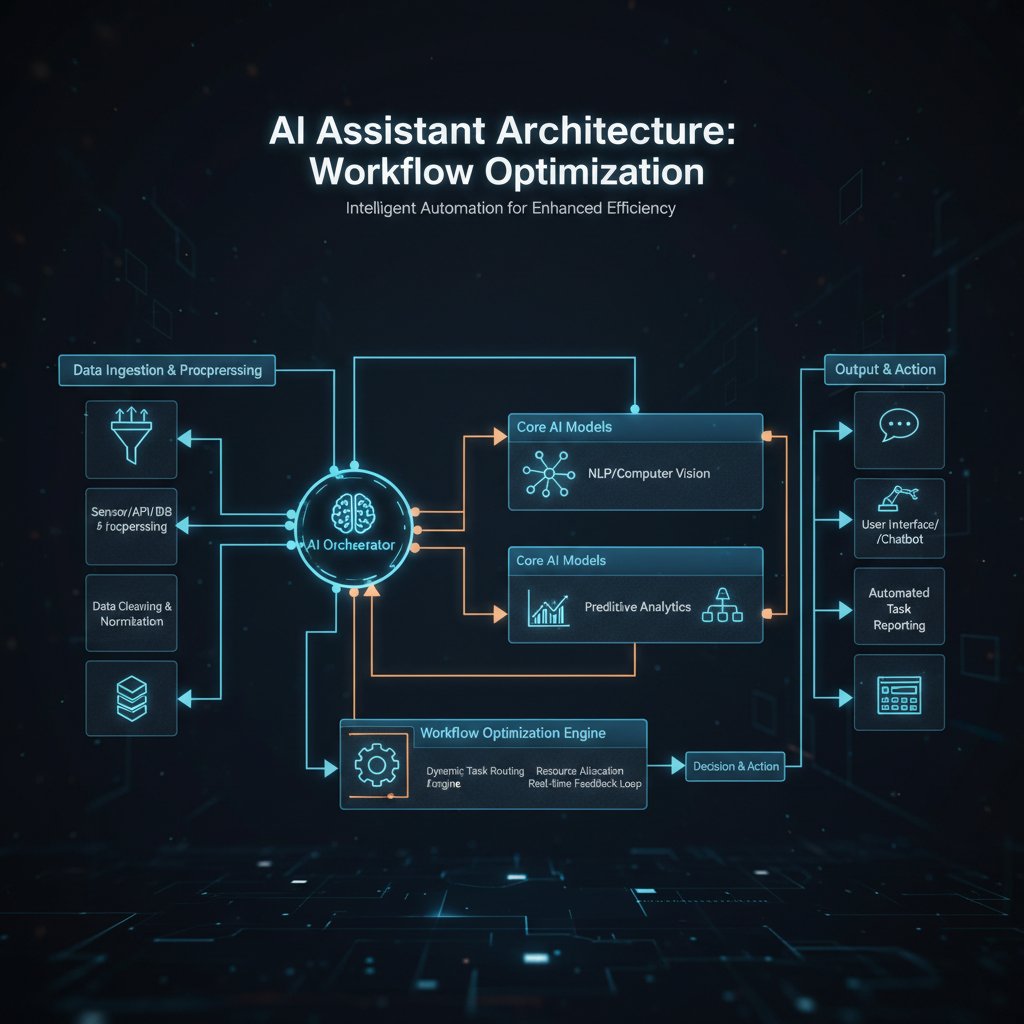
Stripped of the hype, an AI-powered virtual assistant for workflow optimization is a cocktail of machine learning, NLP, and workflow mapping—each performing a delicate dance to automate your tasks. Here’s how it all clicks together, no PhD required.
- Machine learning: Algorithms chew through mountains of historical data to predict, suggest, and act.
- Natural language processing (NLP): This tech deciphers human input—emails, messages, or voice commands—translating your intent into actionable commands.
- Workflow mapping: The assistant analyzes your processes, identifying which steps are ripe for automation and where human input remains critical.
- API integration: These digital teammates connect with your existing tools—email, calendars, CRM systems—through APIs (Application Programming Interfaces), ensuring seamless operation.
AI-powered workflow optimization terms, demystified:
The branch of AI that enables computers to understand, interpret, and respond to human language in a valuable way.
The software layer that models, automates, and manages a sequence of business tasks.
The technique of connecting different software systems to allow data and actions to flow between them automatically.
The ongoing process of refining AI models with new data to maintain accuracy as business needs evolve.
A simple automated agent using “if/then” programming, with no learning capability—now mostly obsolete in workflow optimization.
The difference between yesterday’s rule-based bots and today’s AI assistants is night and day. Old bots were brittle—break one rule, the process grinds to a halt. Modern assistants learn from context, adapt as your workflow changes, and even flag anomalies that might slip past a human eye.
The illusion of intelligence: Where AI falls short
Here’s a brutal truth: AI-powered workflow assistants aren’t “smart” in the human sense. They’re pattern-recognition machines—brilliant at spotting trends in big data, but hopeless at nuance, context, or reading the subtle social cues that make human teams hum. According to Debut Infotech, human oversight remains mandatory for significant decisions, especially when stakes are high or data is incomplete.
"AI can't read the room. It still needs us." — Taylor, Operations Lead, Digital Agency
Edge cases, unforeseen workflow changes, or vague requests are where AI assistants stumble. The best systems provide clear fallbacks—routing ambiguous tasks to a human, or flagging when something falls outside their training. While the marketing hype leans on “intelligence,” the real measure of success is how seamlessly humans and machines collaborate.
Show, don’t tell: Real-world case studies and cautionary tales
Crushing it: Teams that transformed with AI workflow assistants
Consider a composite case study from a media company battling content bottlenecks and email chaos. Deploying an AI-powered virtual assistant wasn’t a magic fix, but the results were hard to ignore: content production increased by 35%, campaign launch times dropped from eight days to three, and staff engagement jumped.
Here’s how they did it:
- Mapped out every workflow: Identified bottlenecks and repetitive tasks, documenting every handoff and delay.
- Piloted with a single department: Started in editorial, where the pain was acute.
- Integrated with email and core tools: Chose an assistant that worked directly in their inbox to minimize friction.
- Trained the AI with real scenarios: Used past data to teach the assistant to recognize priorities and common requests.
- Set up feedback loops: Team members could flag AI missteps, which were quickly reviewed and addressed.
In hindsight, they would have invested more time upfront in customizing the assistant—and less in chasing “nice-to-have” features. As the head of digital put it, “We underestimated the culture change required.”

Crash and burn: Lessons from failed AI assistant rollouts
Not every story ends in a victory lap. One manufacturing firm rushed an AI rollout to automate inventory and scheduling. Lured by grand promises, they skipped key steps: failing to map data flows, ignoring integration with legacy software, and overwhelming staff with untested changes. Within three months, productivity had fallen, staff morale tanked, and the entire project was mothballed at a loss.
The post-mortem revealed costly mistakes:
- Focusing on “cool” features instead of core pain points.
- Underestimating the time needed for onboarding and training.
- Neglecting feedback from frontline workers.
- Ignoring security and privacy compliance.
Common pitfalls in failed AI assistant projects:
- No buy-in from end users.
- Poorly defined success metrics.
- Overreliance on out-of-box automation, leading to process mismatches.
- Failing to plan for ongoing updates, leaving “set and forget” systems to rot.
Learning from failure isn’t just smart—it’s essential. The difference between a workflow AI success story and a cautionary tale is almost always in the details.
Choosing your AI-powered workflow assistant: What matters now
Feature face-off: What to look for (and what to run from)
With options multiplying like unread Slack notifications, the feature lists for workflow AI assistants can quickly become a swamp of jargon. Some promise “seamless integration,” others tout “hyper-personalized automation” or “real-time analytics.” The reality? Many tools overpromise and underdeliver, especially when it comes to integration and customization.
| Feature | TeamMember.ai | Competitor A | Competitor B |
|---|---|---|---|
| Email Integration | Seamless | Limited | Requires add-on |
| 24/7 Availability | Yes | No | Yes |
| Specialized Skill Sets | Extensive | Generalized | Moderate |
| Real-Time Analytics | Yes | Limited | No |
| Customizable Workflows | Full support | Limited | Basic |
Table 3: Feature matrix comparing top workflow AI assistants. Source: Original analysis based on vendor documentation (2024).
The big differentiators? Integration with your existing email and workflow tools, strong data privacy controls, and a user experience that doesn’t require a PhD to operate. Cut through the marketing by demanding real demos, seeking references from similar organizations, and always, always verifying claims with peer-reviewed or third-party data.
ROI or FOMO? Making the business case in 2025
Calculating ROI for an AI-powered virtual assistant means looking past initial licensing costs. Factor in setup time, training, ongoing maintenance, and the cost of mistakes. According to BizTech Magazine, organizations that set clear KPIs and regularly review performance realize up to 30% higher returns than those who “set and forget.”
Here’s how to break down the cost-benefit equation:
- Map current pain points and quantify wasted hours.
- Estimate the assistant’s impact on each workflow.
- Include training and integration costs.
- Monitor ongoing performance and adjust as needed.
Priority checklist for evaluating AI workflow tools:
- Does it integrate with your existing core systems (email, CRM, calendars)?
- Are data privacy and compliance standards clearly defined and documented?
- Is there transparency in how the AI makes decisions?
- Are customization options sufficient for your unique workflows?
- Is human oversight easy to implement for critical steps?
- Does the vendor provide responsive support and regular updates?
- Are case studies or peer reviews available for your industry?
- How does the solution handle edge cases and errors?
If the answer is shaky or missing for any of these, step away from the hype and keep searching.
The secret ingredient: Making AI assistants actually work for your team
From onboarding to mastery: What no one tells you
Even the best AI-powered virtual assistant for workflow optimization can derail quickly if onboarding is botched. The temptation to “flip the switch” and automate everything is strong—but usually disastrous. Teams that succeed start small, iterate, and prioritize feedback over perfection.
Three alternative approaches to training and adoption:
- Champion model: Identify “power users” to guide and support peers, surfacing roadblocks early.
- Sandbox launches: Roll out assistants in a controlled environment, allowing for safe experimentation and rapid iteration.
- Incremental automation: Automate one task or workflow at a time, building momentum and trust as results roll in.
- Continuous feedback: Establish weekly or biweekly reviews to catch issues before they spiral.

Fostering a culture of experimentation—where failures are learning opportunities, not grounds for blame—is the secret sauce. The most successful teams treat their AI assistant as a teammate in training, not a finished product.
People + AI: The new hybrid workflow
The real magic happens when human strengths (intuition, empathy, creativity) mesh with AI’s brute-force processing and pattern recognition. The result is a hybrid workflow: people set the goals, AI handles the grunt work, and together they produce outcomes neither could achieve alone.
Unconventional uses for AI assistants in workflow optimization:
- Scrubbing outdated data from shared drives—months of work in minutes.
- Drafting hyper-personalized emails at scale, without sounding robotic.
- Surfacing “invisible” process bottlenecks by analyzing calendar and email metadata.
- Running sentiment analysis on internal communications to flag burnout risks.
Certain workflows shine with AI—repetitive, rule-based tasks with clear inputs and outputs. Others, especially those requiring creativity, improvisation, or complex negotiations, remain human territory. The trick is knowing which is which—and being willing to experiment.
As AI-powered workflow optimization tools reshape the workplace, the lines between man and machine will blur, opening new doors for collaboration, innovation, and yes—occasional friction.
Beyond the cubicle: Cultural, ethical, and societal impacts
Democratizer or divider? Who really benefits from AI workflow assistants
AI workflow assistants are often hailed as “democratizers”—tools that level the playing field for small teams and under-resourced organizations. Yet not everyone reaps the rewards equally. Access is still skewed: industries with deep pockets and digital savvy leap ahead, while others—especially small nonprofits, aging industries, or regions with poor infrastructure—struggle to catch up.
In marketing, AI assistants automate campaign creation, letting small teams rival big agencies. In healthcare, they streamline patient communications, but only if privacy rules are met. Meanwhile, blue-collar sectors often face a “digital divide,” with frontline workers given few tools or training to adapt.
"It’s a tool, not a magic wand. Depends who wields it." — Morgan, Digital Transformation Consultant
The broader implication: as AI-powered virtual assistants for workflow optimization become the norm, organizations must ensure equitable access, robust training, and ongoing support—or risk deepening the gaps they set out to close.
Ethical speed bumps: Privacy, bias, and transparency
For every gain in efficiency, there’s a corresponding bump in risk. Data privacy and security remain the top concern: handing over email, calendar, and workflow data to third-party assistants introduces vulnerabilities. Regulators are catching up, but compliance is a moving target.
Algorithmic bias—where AI replicates and amplifies human prejudices baked into training data—can have real-world consequences, from unfair task assignments to discriminatory customer support. Transparency in how decisions are made, and clear redress mechanisms for errors, are non-negotiable.
Red flags and best practices for deploying ethical AI workflow assistants:
- Lack of clear privacy policy or data encryption.
- No audit trail for AI-made decisions.
- Inability for users to “overrule” or correct assistant actions.
- One-size-fits-all models that fail in diverse environments.

Looking ahead: The future of workflow optimization and AI-powered assistants
The next wave: What’s coming for AI workflow tools
The story of AI-powered virtual assistants for workflow optimization is still unfolding. Current realities point to more seamless integration, greater transparency, and a push for human-AI collaboration over replacement. According to Market.us, nearly 40% of administrative tasks are already handled by AI assistants—a number that’s expected to keep rising as adoption spreads.
| Year | Predicted Milestone | Trend/Impact |
|---|---|---|
| 2025 | 50% daily knowledge worker use | Workflow AI becomes mainstream |
| 2027 | Near-total email automation | Human focus shifts to strategy |
| 2028 | Universal low-code customization | Non-tech users design workflows |
Table 4: Predicted milestones for AI assistants in workflow. Source: Original analysis based on Market.us, BizTech Magazine, 2024.
Staying adaptable is key. Organizations that treat AI as a living component—requiring updates, oversight, and continuous tuning—will thrive. Those who “set and forget” risk being left behind.
Your move: Staying ahead in the age of AI-powered work
So what’s your play, now that the reality is on the table? Start by getting ruthless about your pain points, realistic about what AI can (and can’t) do, and relentless in your commitment to learning.
Steps to future-proof your workflow with AI assistants:
- Audit your current workflows and identify friction points.
- Prioritize automation targets based on impact, not novelty.
- Pilot AI assistants in low-risk areas, learn, and iterate.
- Invest in user training and feedback mechanisms.
- Regularly review outcomes and realign with business goals.
- Stay informed on privacy, compliance, and ethical standards.
- Embrace a culture of experimentation—failure is feedback.
Continuous learning isn’t just a catchphrase—it’s survival. Platforms like teammember.ai offer insights, best practices, and community forums to help you stay on top of the latest trends and avoid costly missteps.
Supplementary deep dives: Adjacent topics and burning questions
AI virtual assistants vs. traditional automation: What’s the real difference?
While “automation” has been a staple of business IT for decades, the leap to AI-powered virtual assistants is more than just a technical upgrade. Traditional automation bots execute fixed, rule-based tasks (think: “if X, do Y”). AI assistants bring adaptability—they can interpret fuzzy instructions, learn from context, and interact naturally with users.
Definition list:
An adaptable, learning-based digital teammate that uses AI models (including NLP) to interpret requests, automate workflows, and interact with users in natural language.
A pre-programmed tool that executes repetitive, rule-based tasks with no learning or context awareness.
A comprehensive suite that manages, automates, and analyzes business processes, often integrating both bots and AI assistants.
In practice, automation bots excel at high-volume, low-variation tasks—like batch data entry or invoice processing. AI assistants shine where context, interpretation, or user interaction matter—drafting custom emails, summarizing meetings, or automating multi-step approvals.
Common misconceptions and myths debunked
Despite the hype, myths abound around AI-powered workflow assistants. Here’s the truth, stripped of spin.
- AI assistants will replace all human jobs.
Fact: They automate repetitive tasks but rely on humans for oversight and creative problem-solving. - Setup is instant and painless.
Fact: Customization, training, and integration take time and ongoing attention. - AI never makes mistakes.
Fact: Errors happen, especially with poor data or unclear instructions. - More automation always means more productivity.
Fact: Over-automation can introduce bottlenecks and reduce flexibility. - Privacy is a solved problem.
Fact: Data security and regulatory compliance are ongoing battles. - All assistants are created equal.
Fact: Capability, integration, and user experience vary widely. - AI learns everything on its own.
Fact: Human-led training and tuning are essential for continued value.
Practical applications: Surprising industries and use cases
While tech and marketing get the headlines, AI-powered workflow optimization is quietly revolutionizing unexpected sectors.
- Healthcare: Automating appointment reminders, reducing no-shows by up to 30%.
- Finance: Rapid portfolio analysis and compliance checks—saving analysts hours per week.
- Manufacturing: Streamlining inventory management and reducing errors, even in legacy environments.
- Education: Automating administrative tasks, allowing staff to focus on students.

The lesson? Wherever there’s complexity, routine, or data overload, there’s room for AI-powered workflow optimization. The only limit is your willingness to rethink what’s possible.
Conclusion
AI-powered virtual assistants for workflow optimization are not just the latest tech craze—they’re rapidly becoming the backbone of modern digital work. As we’ve seen, the real picture is messy: promises collide with pitfalls, and the path to lasting productivity is littered with both success stories and cautionary tales. The brutal truths? Clear goals, human oversight, and continuous adaptation are non-negotiable. Ignore the marketing glitter—focus on real needs, ruthless prioritization, and an unflinching commitment to learning. Whether you choose teammember.ai or another platform, the future belongs to those who blend technology with human ingenuity, question the hype, and dare to optimize not just their workflow, but their entire philosophy of work. Ready to move past buzzwords and actually get things done? The next move is yours.
Sources
References cited in this article
- BizTech Magazine(biztechmagazine.com)
- Debut Infotech(debutinfotech.com)
- Market.us(scoop.market.us)
- Master of Code(masterofcode.com)
- ClickUp(clickup.com)
- IrisAgent(irisagent.com)
- Yellow.ai(yellow.ai)
- Palos Publishing(palospublishing.com)
- LeewayHertz(leewayhertz.com)
- Intellecs AI(intellecs.ai)
- Netguru(netguru.com)
- VKTR(vktr.com)
- AlphaNome(alphanome.ai)
- IBM(ibm.com)
- Botpress(botpress.com)
- IBM Consulting Case Study(aiexpert.network)
- Microsoft AI Stories(microsoft.com)
- Microsoft Blog(blogs.microsoft.com)
- US DOL Blog(blog.dol.gov)
- UsefulAI(usefulai.com)
- FlowForma(flowforma.com)
- The Digital Project Manager(thedigitalprojectmanager.com)
- Otter.ai(otter.ai)
- OpenTools.ai(opentools.ai)
- Google DeepMind(deepmind.google)
- Aidify(aidify.us)
- Manifestly(manifest.ly)
- ITProToday(itprotoday.com)
- McKinsey(mckinsey.com)
- Medium(medium.com)
- Forbes(forbes.com)
Focus on what matters. Let AI handle the rest.
We know the feeling — another day starts with 50 unread emails, Ads Manager begging for attention, CRM out of date, and meetings without follow-ups. That's why we built TeamMember.ai — an AI team member that takes over all the operational work at the computer. Has its own email address and SMS number. Manages your inbox, runs Meta Ads, updates CRM, processes meetings, monitors social media, generates morning briefings, and controls the browser. Built on OpenClaw — a leading open-source AI agent — with cross-session memory and secure-cloud architecture that keeps your data safe.
Get startedBe First to Try Your AI Team Member
Every week without automation is dozens of hours lost to operational work. Hours you'll never get back. Join the waitlist and get priority access.
Frequently Asked Questions
What percentage of knowledge workers were using intelligent virtual assistants in 2019 compared to 2025?
In 2019, only 2% of knowledge workers engaged with intelligent virtual assistants, but by 2025, that number is expected to reach 50%—a 25x increase according to Gartner reports cited in the article.
What major shift happened in AI workflow assistants around 2019?
Advances in machine learning and natural language processing (NLP) in 2019 enabled workflow assistants to handle context, understand intent, and learn from user behavior—a major leap from the rigid, rule-based systems that came before.
How did the COVID-19 pandemic impact the adoption of AI-powered workflow assistants?
The pandemic forced teams into digital-first modes and exposed weaknesses in legacy systems, which accelerated the adoption of intelligent virtual assistants as organizations sought efficiency improvements.
What types of tasks can modern AI-powered workflow assistants handle?
According to the article, modern AI assistants are orchestrating entire workflows across industries, including scheduling and market research tasks.
From the Archive
Explore more from AI Team Member

AI-Powered Virtual Assistant Tools: Power and Peril Explained
AI-powered virtual assistant tools now handle email, scheduling, and decision-making in modern offices. This article examines their productivity gains and the risks they introduce.

AI-Powered Virtual Help Assistant: Gains and Real Risks
An AI-powered virtual help assistant can streamline workflows, but comes with trade-offs. This article examines what works, failure points, and security risks.

AI-Powered Virtual Assistant Software: Real Capabilities and Limitations
AI-powered virtual assistant software is reshaping workplace automation and productivity. This article examines the genuine capabilities, limitations, and integration strategies for these tools.

Why Most Digital Transformations Fail and How AI Assistants Help
AI-driven virtual assistant adoption addresses why 70% of digital transformations fail. This article explains the barriers, how these assistants reshape workplace processes, and what succeeds in 2025.

AI-Powered Virtual Assistants for Cloud Collaboration: Benefits and Risks
This article examines AI-powered virtual assistants for cloud collaboration, exploring both genuine productivity gains and substantial risks including privacy concerns and workflow disruption.

How AI-Driven Virtual Assistants Tackle Workload Management
AI-driven virtual assistant for workload management separates hype from reality. This article examines how these tools address burnout, their actual limitations, and which strategies work in practice.




